

Architecting a Conversion Engine in Swift
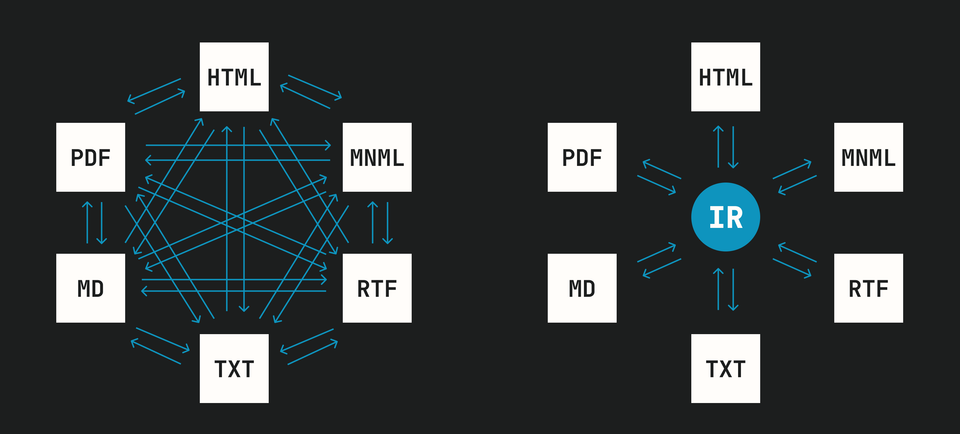
It’s not easy to coerce one file format into another, and adding support for more and more file formats gets ever more complex. To manage this complexity, we built a cohesive system that relies on an Intermediate Representation to serve as a middleman across file formats. The Intermediate Representation (or “IR”) allows us to simply convert a given file format to and from the IR, instead of across every possible file format pair.
Intermediate Representation
If we were to convert notes directly from one format to another, we’d be caught in a complex web of conversions that only gets more complex as we add more file formats. To avoid this mess, we first built a system called Intermediate Representation.
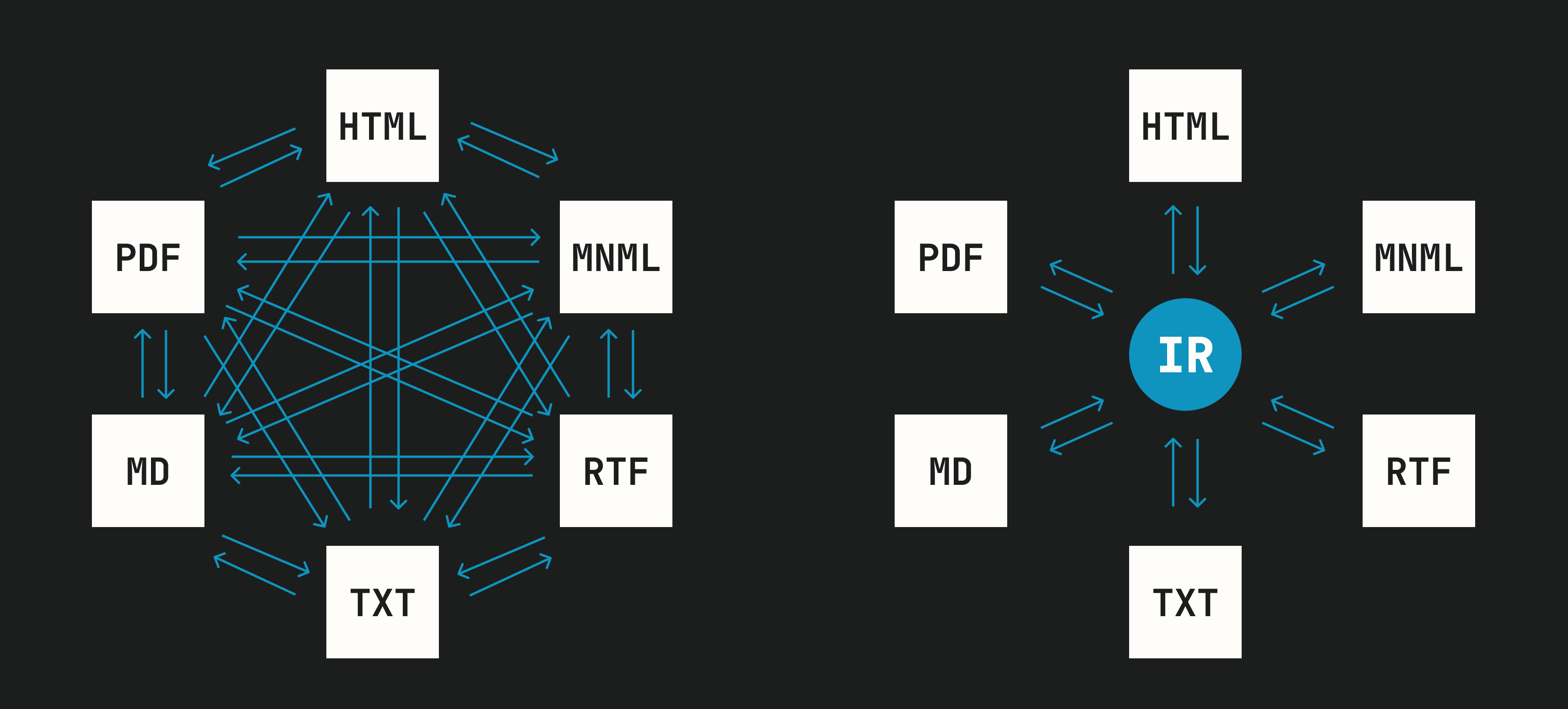
The IR sits in the middle of all file formats. With this architecture, adding support for a new format simply requires building that format’s own bespoke converter, without any concern for other file formats. Complexity grows linearly as we expand support to new types of data.
Nature does this.
Biologists call this the bow-tie or hourglass architecture. In gist, a simplified intermediary stage allows the two sides of the interaction to be independently complex.
For example, a cell consumes an incredible array of molecules that is then digested into a smaller set of shared intermediaries (catabolism). On the other side, the cell then assembles these intermediaries back into the complex array of molecules that the cell puts to use (anabolism). If the cell had to map all of the input molecules to the required output molecules, it would need multiple times more internal processes to fully metabolize. The Intermediate Representation makes it simpler and makes either side of the operation more evolvable.
However, nature provides a powerful lesson for programmers and designers: systems that depend on a shared intermediary often get frozen. While the IR makes it easier for any side of the equation to evolve on its own, it makes it harder for the broader system to evolve: changing the definition of the IR requires everything that interacts with it to update to the new shape.
An excellent example of architectural lock-in is the genetic code, often described as a "frozen accident." Nucleic-acid information (stored in DNA and copied as RNA) is read in 3-unit sequences called codons, and each codon is an instruction for the assembly of amino acid chains. The meaning of these symbols is so deeply embedded in the machinery of life that it cannot simply be changed or re-interpreted; if the meaning of a codon were changed, proteins would be misconstructed by the cell.
The genetic code – the shared mapping of codons to amino acids – is like a biological Intermediate Representation. It sits between the nucleic-acid sequences and the construction of proteins, determining how complex life is expressed via a standardized code. This standard is nearly universal across life for a reason: once it became central to the expression of cellular machinery, it became increasingly improbable that the shared logic and rules might change.
Code
Below is our IR's document structure, written in Swift. We placed it in its own "IR" namespace to prevent naming collisions without creating a dedicated package (this code lives alongside the rest of our code).
/// Namespace for the Intermediate-Representation.
enum IR {
    // Intentionally has no cases. Exists purely to scope the types below.
}


// MARK: - Document

extension IR {

    /// A parsed note in dialect-neutral form.
    struct Document: Equatable {

        /// A sequence of `Block` (stacks vertically), each containing a sequence of `Inline` (stacks horizontally).
        var blocks: [Block]

        var resources: [String: Resource]

        init(blocks: [Block] = [],
             resources: [String: Resource] = [:]) {
            ...
        }
    }
}


// MARK: - Blocks

extension IR {

    /// A unit of textual content that stacks vertically.
    indirect enum Block: Equatable {
        case blankLine
        case paragraph([Inline])
        case codeBlock(language: String?, content: String)
        case heading(level: Int, inlines: [Inline])
        case bulletList([ListItem])
        case orderedList(items: [ListItem], start: Int)
        case todoList([TodoItem])
        case blockquote([Block])
        case pullquote([Inline])
        case horizontalRule
        case embed(resourceId: String)
    }

    struct ListItem: Equatable {
        var blocks: [Block]
        init(blocks: [Block]) { self.blocks = blocks }
    }

    struct TodoItem: Equatable {
        var checked: Bool
        var blocks: [Block]
        init(checked: Bool, blocks: [Block]) {
            ...
        }
    }
}


// MARK: - Inlines

extension IR {

    /// Content that flows horizontally inside a block.
    indirect enum Inline: Equatable {
        case text(String)
        case strong([Inline])
        case emphasis([Inline])
        case underline([Inline])
        case link(url: String, inlines: [Inline])
        case inlineCode(String)
        case folder(name: String)
        case embed(resourceId: String)
        case lineBreak
    }
}


// MARK: - Resources

extension IR {

    /// An embed payload. Held off the tree and referenced by id.
    struct Resource: Equatable {

        var kind: String

        var mimeType: String?

        var data: Data?

        var url: String?

        var attributes: [String: String]

        init(kind: String,
             mimeType: String? = nil,
             data: Data? = nil,
             url: String? = nil,
             attributes: [String: String] = [:]) {
            ...
        }
    }
}
Real code describing the IR (Intermediate Representation) structure.
Not all file formats support the same conventions (eg, Markdown doesn’t represent colored text, and MNML doesn’t support tables), so during conversion we’ll often emit concessions.
/// A record of something the engine simplified, downgraded, or set aside during conversion.
struct Concession: Equatable {

    var category: Category

    var description: String

    var count: Int?

    init(category: Category,
         description: String,
         count: Int? = nil) {
        ...
    }

    enum Category: Equatable {
        case unsupportedFormatting
        case downgraded
        case dropped
        case truncated
    }
}

extension Array where Element == Concession {

    mutating func appendOrIncrement(_ concession: Concession) {
        ...
    }
}
Real code describing the structure of concession aggregation and reporting.
Parsing and Rendering
Conversion begins by parsing the source file into the IR, and ends by rendering the IR into the target file format. Below are DocumentParser and DocumentRenderer protocols. Each file format needs to implement its parsing and rendering logic by crafting bespoke implementations of these protocols.
/// Protocol for producing an `IR.Document` from source text of a specific `Format`.
/// Each parser handles exactly one input format — `DocumentParserMinimal` reads MNML, `DocumentParserHTML` reads HTML, and so on. The orchestrator picks the right one based on the caller's `Format`.
/// Parsers never render. Their only output is the Intermediate-Representation and any concessions.
protocol DocumentParser {

    /// The input format this parser handles.
    var format: Format { get }

    /// Parse `source` into an IR document.
    /// Any content the IR can't represent is recorded in the result's concessions.
    func parse(_ source: String) throws -> ParseResult
}

/// The outcome of a parse: the IR document, plus a record of what was simplified.
struct ParseResult: Equatable {
    var document: IR.Document
    var concessions: [Concession]

    init(document: IR.Document, concessions: [Concession] = []) {
        self.document = document
        self.concessions = concessions
    }
}
DocumentParser protocol. Real code.
/// Protocol for producing output of a specific `Format` from an `IR.Document`.
/// Each renderer handles exactly one output format: `HTMLRenderer` emits HTML, `MNMLRenderer` emits MNML, and so on. The orchestrator picks the right one based on the caller's `Format`.
/// Renderers never parse. Their only input is the Intermediate-Representation; their only output is the rendered form and the concessions incurred producing it (see `RenderResult`).
protocol DocumentRenderer {

    /// The output format this renderer produces.
    var format: Format { get }

    /// Render `document` into this renderer's format.
    /// Any IR content the target format can't express is recorded in the result's concessions.
    func render(_ document: IR.Document) throws -> RenderResult
}

/// The outcome of a render: the output payload, plus a record of what was simplified.
/// Output is carried as `Data` so this struct can serve text and binary formats alike.
/// Text formats (HTML, Markdown, MNML, plain text, RTF) populate `data` with UTF-8 bytes; binary formats (PDF) populate it directly.
struct RenderResult: Equatable {
    var data: Data
    var concessions: [Concession]

    init(data: Data, concessions: [Concession] = []) {
        self.data = data
        self.concessions = concessions
    }
}
DocumentRenderer protocol. Real code.
For example, to support HTML we implemented DocumentParserHTML and DocumentRendererHTML, and to support Markdown we implemented DocumentParserMarkdown and DocumentRendererMarkdown, allowing us to convert between HTML and Markdown files. Building parsers and renderers for each file type, we can convert from one to the other with ease.
Here is how we coerce an HTML file into Markdown:
let content = try readFile(at: url)
let parseResult = try? DocumentParserHTML().parse(content)
let renderResult = try? DocumentRendererMarkdown().render(parseResult.document)
let renderedMarkdownText = String(decoding: renderResult.data, as: UTF8.self)
With deep modules and shallow interfaces (shout out to John Ousterhout), using the conversion engine is very easy.
Integration in Our Notes App
Making our conversion engine a well-appreciated feature within the Minimal app took careful consideration. The obvious case is simple: export notes, and import notes, but we realized there's opportunity for more subtle capabilities – which are the kind of opportunities that our app is all about (if can deliver a feature without an interface, we're thrilled).
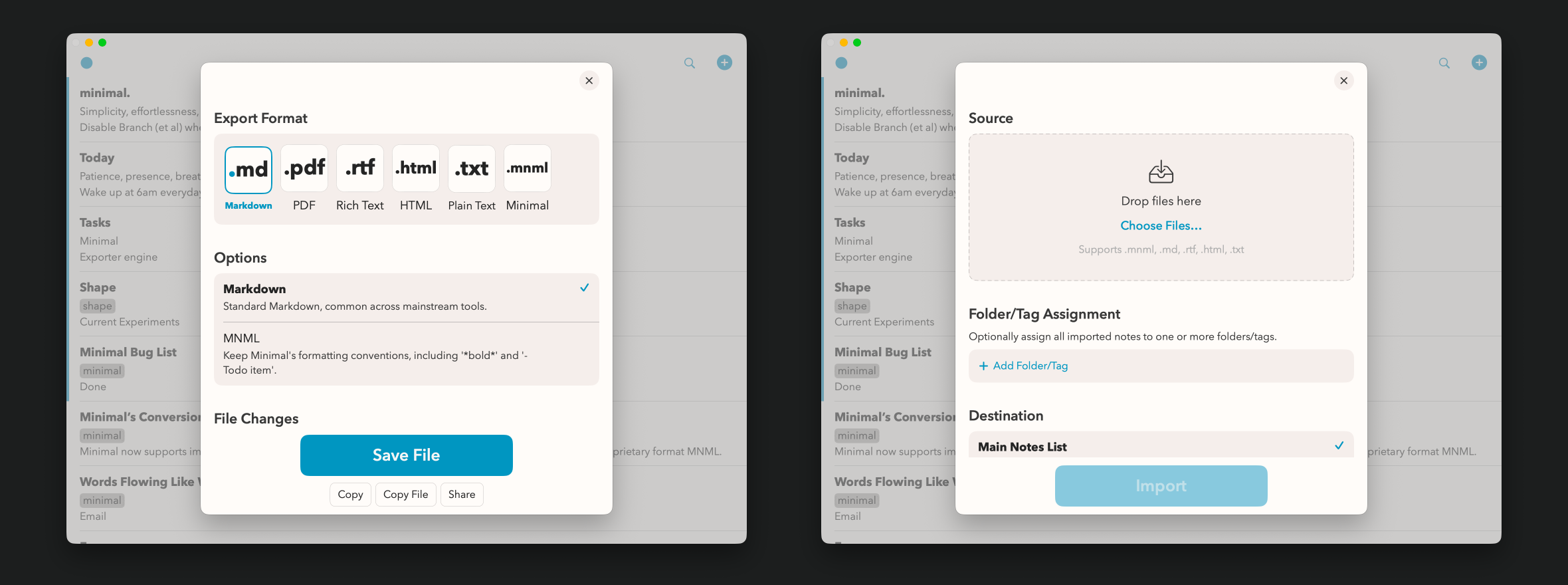
We originally built the conversion engine in response to a deluge of requests to support imports from other writing apps as well as exports to the Mac file system. Once we had the conversion engine working, we realized that it deserves to be used throughout Minimal, and not just in a formal “Export” or “Import” dialogue.
We encountered the following Import surface areas, and built first-class support for each case:
- Drag into the Notes List
- Drag into a note
- Paste on the Notes list
- Paste files into a note, and paste Rich Text into a note (eg, copy from Pages and paste in Minimal)
- Importing notes with the Share extension from apps that support system sharing
- Menu > File > Import
Similarly for exports:
- Via Note Action button > Export
- Notes List > right-click/long-press > Export
- Command-shift-E export keyboard shortcut
- Quick Export, exporting a note instantly using the most recently used export settings, via command-option-E
- Menu > File > Export
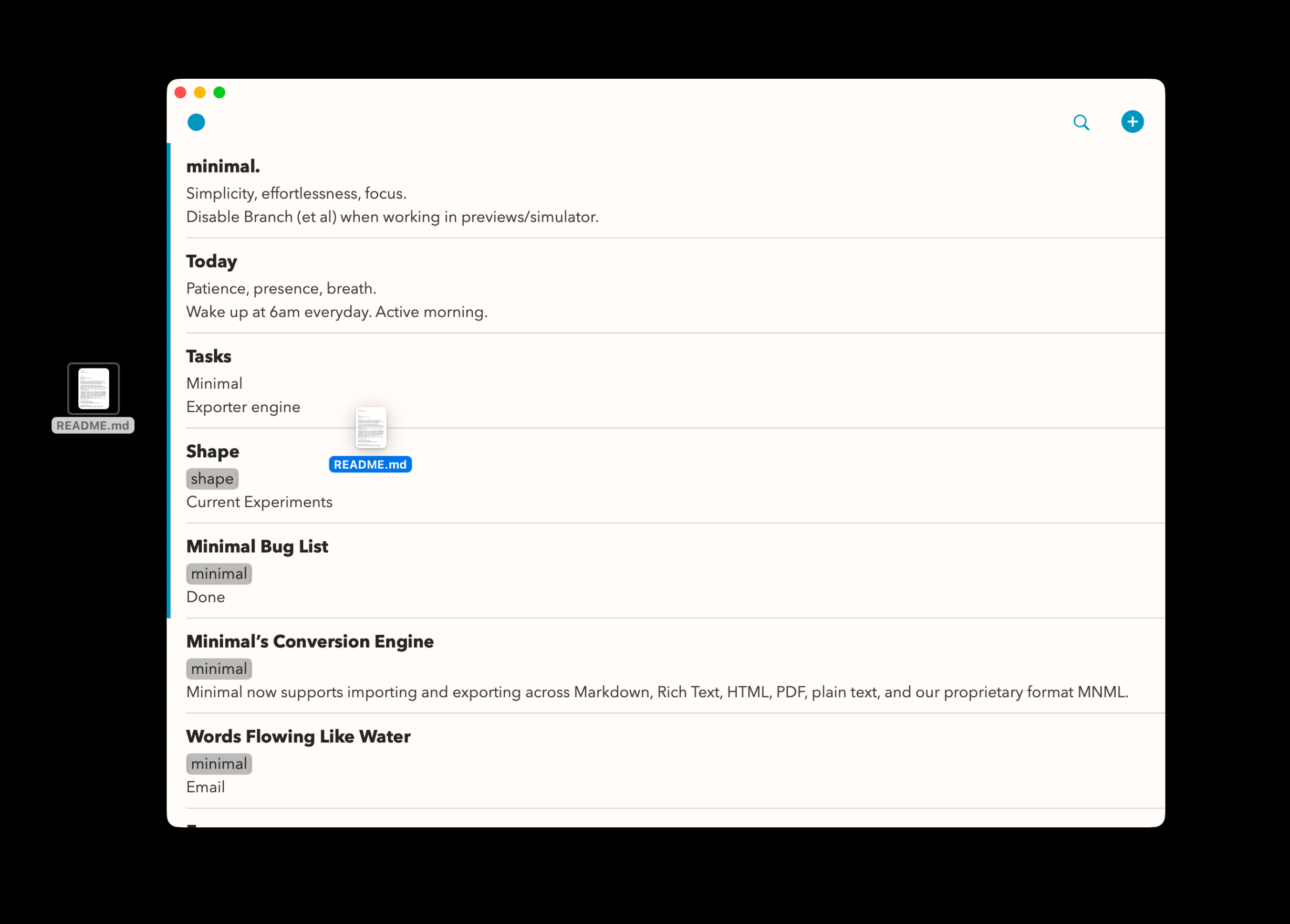
To serve all of these scenarios, we built a series of utilities to detect file types, recursively handle folders, emit concessions and report import/export degradation, stage files during bulk import/export, and support roundtrip export-import flows.
To support the export-import roundtrip we built a proprietary .mnml file type. When writers import these files, Minimal knows to import notes verbatim, avoiding concessions entirely while perfectly re-importing, 100% of the time.
extension UTType {

	 // (Declared in Info.plist via `UTExportedTypeDeclarations`)

    /// Minimal's first-class file format. Preserves MNML conventions verbatim.
    /// Round-trips through Minimal with full fidelity.
    static let mnml: UTType = UTType("app.minimal.mnml") ?? .plainText

    /// The de facto Markdown UTI adopted broadly across Markdown tooling.
    static let markdown = UTType(importedAs: "net.daringfireball.markdown")
}
Proprietary MNML file type. Real code.
To support Rich Text copy-and-paste, we built our own pasteboard that accommodates multiple formats while ensuring that within-app pastes will avoid lossy conversion-engine roundtrips:
/// Provides various data types (plain text, RTF, HTML, native Minimal plain text) so writers can copy from Minimal and paste anywhere.
/// Includes a native Minimal-specific data type so that within-Minimal copy-paste's do not roundtrip through RTF.
enum MinimalPasteboard {

    /// Pasteboard types for which we enable Paste, richest first.
    static let pasteableTypeIdentifiers: [String] = [
        UTType.rtf.identifier,
        UTType.html.identifier,
        UTType.utf8PlainText.identifier,
        UTType.plainText.identifier,
        UTType.text.identifier,
    ]

    /// Builds the pasteboard item for copying `source` (text in the writer's dialect).
    /// The native and plain representations are always present; RTF/HTML are best-effort.
    static func pasteboardItem(for source: String) -> [String: Any] {
        var item = MinimalPasteboard.nativeItem(for: source)
        item[UTType.utf8PlainText.identifier] = source
        if let document = try? StyleSettings.preferredParser().parse(source).document {
            if let rtf  = try? DocumentRendererRTF().render(document).data  { item[UTType.rtf.identifier]  = rtf }
            if let html = try? DocumentRendererHTML().render(document).data { item[UTType.html.identifier] = html }
        }
        return item
    }


    // MARK: Native Source

    private static let nativeType = UTType.mnml.identifier

    /// The native entry to merge into a pasteboard item on copy.
    private static func nativeItem(for source: String) -> [String: Any] { [nativeType: Data(source.utf8)] }

    /// Minimal's own source carried on `pasteboard`, if present.
    static func nativeSource(from pasteboard: UIPasteboard) -> String? {
        guard let data = pasteboard.data(forPasteboardType: nativeType) else { return nil }
        return String(data: data, encoding: .utf8)
    }
}
Pasteboard overrides to accommodate numerous file formats. Real code.
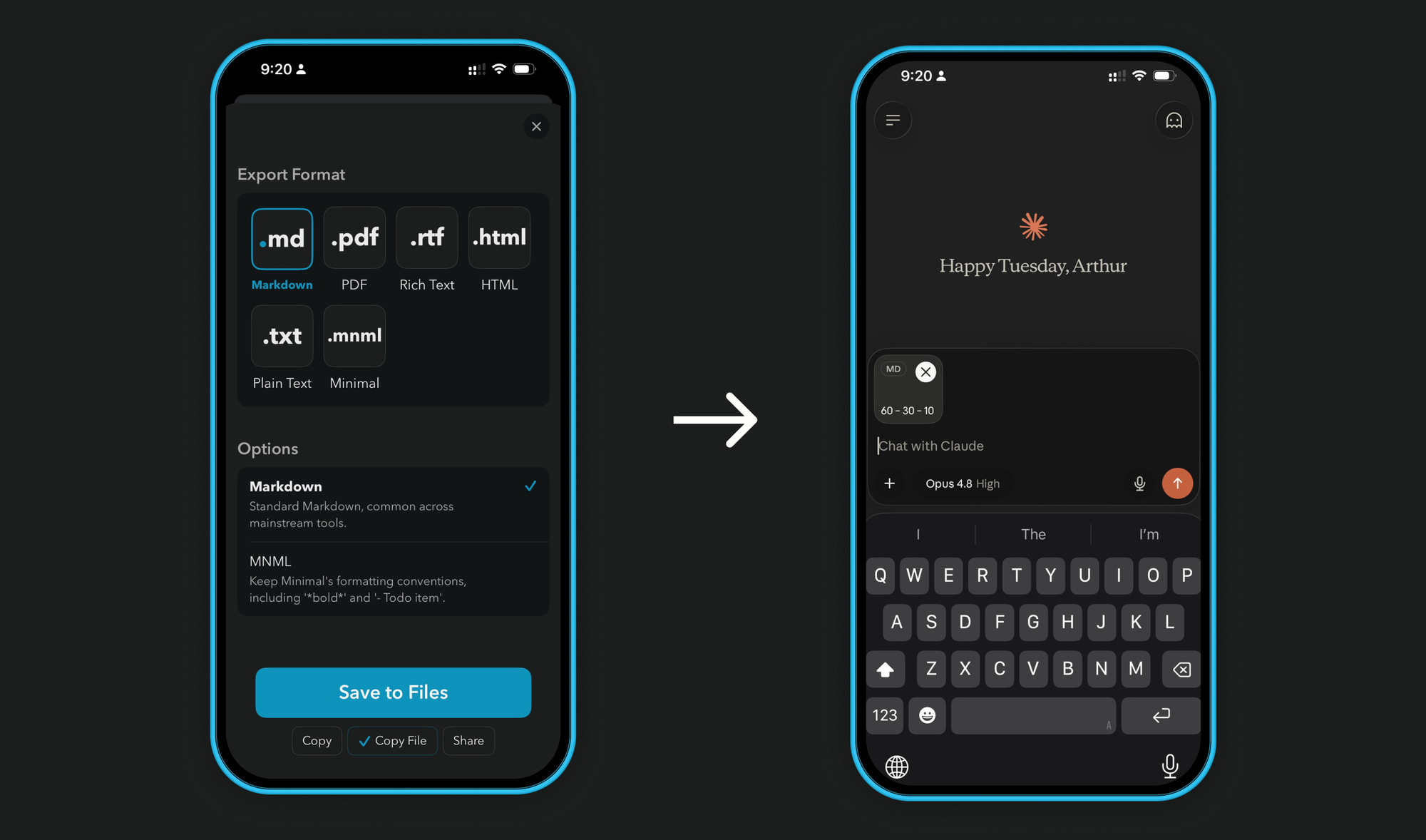
These features combine powerfully. For example, a writer can bulk export thousands of notes with confidence as they change Apple ID’s or move notes from a work computer to a personal device. As another example, writers can store technical documentation in Minimal and use the Quick Export keyboard shortcut to rapidly copy/paste Markdown files directly into LLMs like Claude or ChatGPT.
let quickExport = UIKeyCommand(title: "Quick Export",
                                       action: #selector(quickExportNoteViaCommand),
                                       input: "E",
                                       modifierFlags: [.command, .alternate],
                                       discoverabilityTitle: "Quick Export")
UIKeyCommand for Quick Export. Real code.
This is the outcome of a Quick Export. Claude is ready to read the file into context and produce a more relevant response.
The conversion engine itself is a powerful piece of code, but the real utility exists where the engine gets integrated throughout the Minimal app. You can read about our design choices right here.
Written by a human.